Wednesday, April 29, 2009

Verizon’s BlackBerry Storm Receives New OS Update

Chris wrote on mobilewhack: For all you Storm users under contract with Verizon, there’s a new OS that’s going to arrive soon. In a recent internal Verizon memo OS version 4.7.0.141 is mentioned. The memo also says that the new OS is here and it should be available soon to all Verizon customers that own a BlackBerry Storm 9530. RIM is apparently working on an even bigger version, 4.7.0.201 for the same phone but until such version is available you should try out Verizon’s update. As always, make sure you backup before you start messing up that RIM phone. And make sure you tell us how you feel about the new OS!

Tuesday, April 28, 2009

Five Free Applications for BlackBerry

Here are 5 applications that can make your BlackBerry more fun. There is a free applications for your Blackberry.

1. Opera Mini
This browser is not an alternative as soon as the browser built-in BlackBerry 4.5, but will serve the page and zoom parts of the screen as if viewed with a normal PC.

2. Flickr
From the Flickr application, you can go directly to the camera or choose a photo from the media card or one of your media directory.

3. Facebook
Very easy to update the status, read the message, and send messages to friends walls and send photos directly to the page of your images with the application is free.

4. NewsGator Go!
Sign up for a free account NewsGatorOnline to your existing account. Web reader is free and members can synchronize NewsGator Online that you use. So if you’re using FeedDemon on a PC or NetNewsWire on the Mac, all feeds that can be accessed on another computer or in your BlackBerry using the web reader NewsGator.

5. Vopium - the cheapest calling solution

make cheapest international calls from your blackberry from vopium

Friday, April 24, 2009

RIM - Best Mobile Technology Breakthrough

The revolutionary BlackBerry® Storm™ 9500 SurePressTM touchscreen is large and vibrant with a truly tactile touch interface. Purpose-built for exclusive carriers, Vodafone and Verizon Wireless, the BlackBerry Storm SurePress touchscreen is a world first and overcomes difficulties associated with typing on traditional touchscreen devices. It builds on RIM’s acknowledged leadership in the smartphone market and takes it to the next level by incorporating touch with confirmation so users are able to experience a new level of interaction with a touchscreen mobile device. The precision typing and navigation enables a whwhole range of applications and features that have not been possible on a touchscreen mobile device. Website

Judges' comments: "RIM does it again, with a new twist to the touch screen. The SurePress screen incorporates touch with confirmation, taking interaction to a new level."

Thursday, April 23, 2009

Free web and BlackBerry solution will revolutionize your calendar

tungle ui blackberry

Tungle Accelerate is a free and comprehensive web-based platform. It is a next-generation solution that increases the value, improves the effectiveness and extends the life of current electronic calendaring systems by seamlessly linking and syncing its platform to provide advanced features for Outlook, Exchange, Google Calendar, iCal and Entourage, among others.

Tungle Accelerate significantly increases the accuracy while decreasing the time it takes to schedule and book meetings between individuals or groups – inside or outside an organization. It enables the proposal of multiple time slots with just one click; for the first time, permits people to see all invitees’ free / busy schedules both inside and outside organizations’ groupware platforms, before invitations are sent – and prevents double-booking through its intelligent and dynamically updated meeting invitations. This significantly decreases frustration and accelerates the speed of booking meetings.

“Despite all of the advances in communications and online meeting tools, people often still feel hopelessly frustrated when trying to schedule a meeting for a group of people from different organizations because of the difficulty in accessing calendars,” said Mark Levitt, vice president for Collaboration and Enterprise 2.0 Strategies at IDC. “Tungle changes this paradigm by accelerating the process of sharing relevant calendar information to allow people to focus on having productive meetings, rather than on meeting logistics.”

“We are excited about what is in store for Tungle” said Chris Shipley, Chairman of the Guidewire Group and executive producer of the DEMO conferences. “They have identified a significant pain for all professionals and are tackling this problem in a way that is simple, ingenious and effective.”

“Calendars were originally designed to help people be more productive. However, electronic calendaring systems are silos and don’t facilitate the easy scheduling of meetings between individuals or groups, and certainly not with people outside an organization or on a different system,” said Marc Gingras, chief executive officer at Tungle. “Tungle Accelerate breaks down those electronic calendar silos, significantly reducing wasted time and effort. The best part is that people don’t need to learn a new electronic calendaring or groupware package.”

Tungle works in sync with leading electronic calendars so busy people don’t have to switch over to an entirely new system to get the benefits of calendar acceleration. Supported calendars include: Outlook - with or without Exchange, Google Calendar, Apple iCal, and Entourage for MAC. In addition, Tungle recently partnered with IBM and will be working with them to accelerate Lotus Notes later this year.

Tungle also enables users to create a personal Meet with MeTM link that can be added to their email signature and public profile on services that include LinkedIn, Facebook and Xing. With it, a person can publish their availability and allow others to easily schedule meetings with them, without having to sign up with Tungle.

In stark comparison to what calendars alone provide, synching Tungle Accelerate with their electronic calendar or groupware, people can:

• Coordinate one-on-one or group meetings with anyone, even non Tungle users.
• Propose multiple time slots to avoid the ongoing back and forth emails/phone calls to find the one time that works for everyone.
• Prevent double-bookings with meeting invitations that dynamically update when they add new events to their calendar, so meeting conflicts are eliminated.
• Share their free/busy or detailed calendar across different companies and environments.
• Set up a personal Meet with MeTM link in their email signature or public profile (LinkedIn, Facebook, Xing, etc), and allow others to view their availability and schedule meetings, without having to sign-up.
• Leverage smartphone (BlackBerry and iPhone) meeting invitation support – with no download required.
• Initiate meeting invitations and view shared calendars from their Outlook or Google Application.
• Enjoy automatic time zone detection that dynamically customizes meeting invitations for the recipient’s time zone.

via

Download Tungle and accelerate your calendar now
.

Tuesday, April 21, 2009

Password and Security Management Software for Blackberry

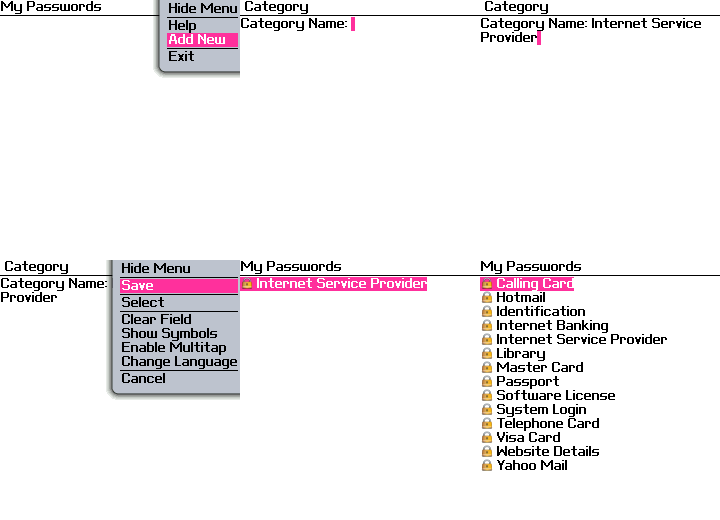
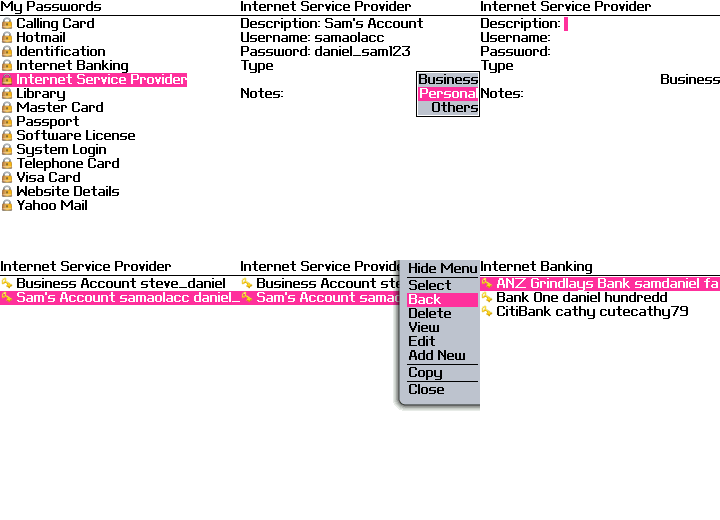
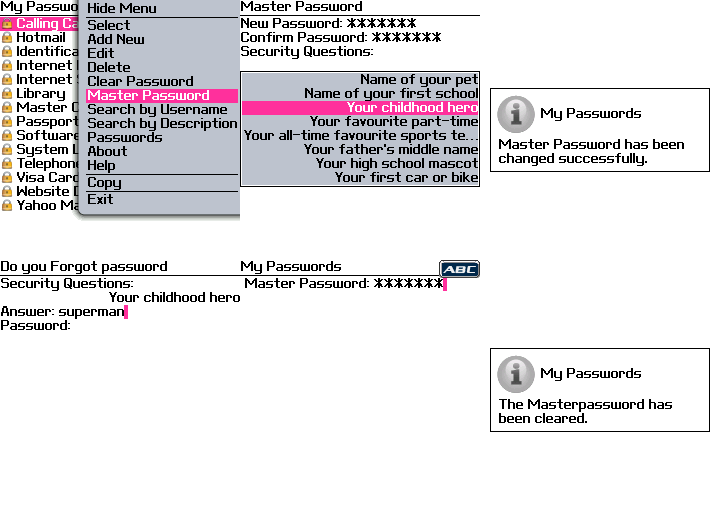
My Passwords is a Comprehensive Password and Security Management Software. My Passwords provides the best place to store your Secret details such as Passwords, Personal Identification Numbers, Credit Cards etc. in a secured format. Two Splendid Search option based on Description and Username are provided. A Complete Security Management Utility. GET IT HERE


Categories:
  • Any number of Categories can be added with user's choice.
  • Easy User-Interface.
  • Simple way to Edit and Delete the Categories.
  • Categories are displayed in a sorted format.


  • Passwords / Entries:
  • Any number of Secret Details can be added within a category.
  • Detailed Notes are provided for each entry.
  • Every Password details of a category can be viewed in a Single Report Page with all details.
  • Great options for Editing and Deleting.
  • Entries for each Catogory are displayed in a sorted format.


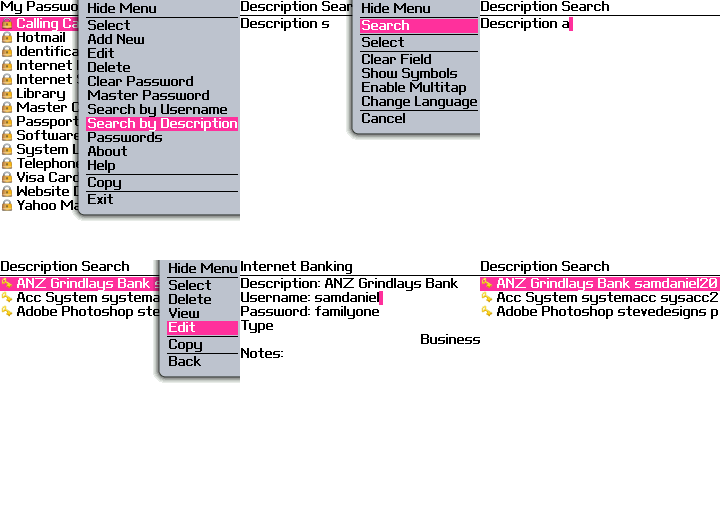
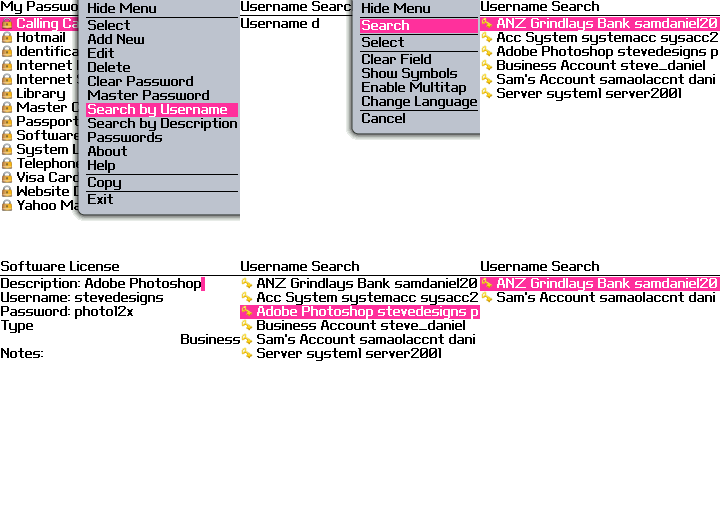
  • Twin Search Option:
  • Finest Searching options for a Password Protector.
  • Two Search options are provided based on Description and Username.
  • Search option is performed simply by entering the Word, Name, Description, Username, Starting Letter etc.
  • Edition and Deletion of data can be performed using the Search List.
  • All required details will be displayed in the Search List.


    Search By Description

    Search By Username


    Master Password:
    My Passwords is protected by a Master Password. User can set their Master Password with Security Question and Answer. Master Password prevents unauthorised use of your Secure details by others. It makes your details more secure.


    Key Feautures:
  • Professionally and Newly designed user-interface that speeds up Data Entry and Easy Viewing.
  • Every data is stored in a sorted format.
  • Finest Twin Search option by Description and Username.
  • Master Password to ensure security.
  • Any number of sub-details can be added for a particular category.
  • Protects you from forgetting your Secret details.
  • Adds Safety to your confidential details.
  • No one can view the details except you.
    My Passwords makes you feel safe
    It is Only for You
  • Monday, April 20, 2009

    Pimp My BlackBerry?

    It looks like the people at Research in Motion, the creators of the BlackBerry Mobile devices, have taken a cue from Apple Computer and introduced the BlackBerry App World, a virtual destination for applications that will enhance your BlackBerry experience. As a long time Apple iPhone user, I was intrigued by this announcement and wanted to take a moment to look under the hood of this new service and check out applications I would love to have on my BlackBerry device, if I owned one.

    BlackBerry App World

    The Scouting Report

    I headed over to the BlackBerry App World website, thinking I would be able to view a littany of fresh applications, only to be surprised at the fact that you must first own a particular BlackBerry device to view the service. But not any old device will due. You must own a BlackBerry smartphone, running BlackBerry® Device Software version 4.2 or higher, to even be able to download the App World application to browse the wares. What do you do if you are a window shopper and not certain if you want to download this additional application? What if I am in a location where the network is overworked and my connection speed is not nominal or, like this never happens, you are in a dead zone?

    I was immediately frustrated by this notion. Apple’s App store can be accessed via your iPhone, on the go, or through your iTunes application, when you are in front of your computer, and it works with both versions of the phone. Look, I understand that RIM is playing “catch up” in this field, but I would think they would’ve thought this one through. Limiting the ability to window shop for applications just to the device itself seemed antiquated and one dimensional. Plus, when I combine that with the number of online reveiws I’ve read regarding the instability of the App World application as a whole, I become even more perplexed.

    Where are the apps?

    But, I digress. I wanted to bring you a fresh list of noteable applications that would start you on your way. Unfortunately, I cannot. I did see that the usual suspects, such as Facebook and AOL Instant Messenger, have applications available that are free. But, I was more curious to see if there were any hidden gems by third party developers that you would find handy. The only two I have seen, so far, are a lite version of Skype, which will be availble May 2009, and Shazam, a song recognition application that I personally cannot live without on my iPhone.

    ShazamIf you are a music junkie who always want to know what song you are listening to, who the artist is and where you can purchase the track, this song recognition software is tailor made for you. Simply launch the application when you hear a track you would like more information on and let Shazam do the rest. And, within moments, you will have all of the information you need to grow that music collection. You can also share your information with your friends easily through the application. Head over to the official Shazam website for more information. There is a 60 day trial offer. After 60 days, the application is still free, but you will be limited to only certain functions within the application.

    What to look forward to

    There is a lot to be said for the ease of use and plug and play capabilities of the iPhone and the supporting application. Plus, the fact that the device can be used on either an Apple Computer or a PC makes it even more desireable. But ease of use has never been the case for the BlackBerry devices and the trend seems to be continuing with their App World application. I just get the feeling that not enough thought was put into how the end user would use, or would want to use, the software. And not being able to window shop for applications left me with a handicap. I am hoping there are handy apps for you to interact with your multitude of social networks like Twitter and Digg, or a great and stable RSS reader so you can stay up to date with vidagirl, but I just don’t know at this moment.

    But, if you own a BlackBerry® smartphone, that meets the minimum system requirements, you simply need to download the BlackBerry App World application and you are on your way! Unfortunately, this is only available to customers in the United States, Canada and the United Kingdom.

    Thursday, April 16, 2009

    BlackBerry Web Browser Shortcuts from CrackBerry

    BlackBerry Browser Tips


    The Call for BlackBerry 101 Article Ideas post we ran last week got a great response - over the weeks / months ahead you'll see a new burst of helpful how tos and guides hit the blogs that'll further build out the knowledge base in our existing lecture series.

    One of the areas where readers expressed interest in learning more was in regards to the BlackBerry web browser. For a lot of new-to-BlackBerry owners it isn't readily clear as to how to get the most out of it. Back on New Year's Eve we posted a must-read article called BlackBerry Browsers Explained, which walked through the basics of the native browser (the differences between Internet browser, Hotspot browser, etc.). After knowing when and how to use each browser, the next step in becoming speedy is learning the shortcuts!

    The BlackBerry is full of useful shortcuts, and the BlackBerry web browser is no exception. Some browser shortcuts overlap with others on the device as they should -- t for top, b for bottom and spacebar to scroll down the page in steps -- while others are more browser specific and sometimes a little less intuitive: h for the homepage, r to refresh, g to go to an address, s for options, k for bookmarks, u to hide the status banner at the top, i and o to zoom in and out. There are even more shortcuts and tricks for the BlackBerry browser and it just so happens our pal Al Sacco posted an in-depth browser tricks guide earlier this week that really drills into it. If getting the most out of your BlackBerry browser is on the agenda, I suggest you check it out. To learn even more BlackBerry keyboard shortcuts, you'll want to check out this post.

    Wednesday, April 15, 2009

    Pandora for BlackBerry Storm Updated

    pandora-bb1

    I absolutely love Pandora and talk about it every chance I get. This is one of those times. Pandora has been out for the BlackBerry for a bit but it didn’t support the large touch screen on the Storm. That’s a thing of the past as the latest version now runs just fine on the BlackBerry Storm, even though the Pandora site doesn’t say so yet.

    (via CrackBerry)

    Tuesday, April 14, 2009

    No camera version of BlackBerry 8350i now available from Sprint

    Tired of having to turn your precious BlackBerry over to an attendant every time you hit your gym locker room? Sure it’s a bit later than the rumor mill had anticipated, but Sprint may finally have the answer for you. The 8350i is now available without that pesky 2 megapixel shooter. Pricing on the 8350i sans-camera is lined up exactly with the older version that includes a camera, albeit barely usable, at $149.99 after $100 mail-in rebate and a 2-year contract. As far as specs go, no need to go through all that; it’s an old school BlackBerry Curve with PTT and no camera. Oh and it has Wi-Fi just like the regular 8350i, which is nice. Of course there are all kinds of reasons a camera-less Curve could be a requirement for you — or more likely your company — so let the enterprise orders commence. boygenius

    Monday, April 13, 2009

    BlackBerry Season in Papua New Guinea

    Papua New Guinea only got into BlackBerry technology in February this year, thanks to Digicel, but one politician is already using this big-time to the max.

    Bulolo MP Sam Basil is already using BlackBerry technology to take and email high resolution photographs as well as stories to the media from rural areas in his electorate.

    This was epitomised during the recent conflict in Wau when he tooked and emailed photos as well as stories right from the scene to the newspapers.

    This worked very much to the advantage of The National, because as there wasn’t any reporter available at the time to travel up to Wau, Mr Basil was a politician-cum-journalist.

    He is arguably the first PNG politician to use BlackBerry technology in such a way and has already become the tech-savvy Digicel pin-up boy for this gadget.

    I say tech-savvy because Bulolo, albeit a rural area, has over the last two years seen a communications revolution in which more people are using telephones and internet there because of their MP.

    BlackBerry technology has been around the Westernised countries for some time now and was only introduced in PNG this year to cater for the needs of businessmen and professionals.
    A first in the country, this means Digicel, which is still on 2.5 Generation System, is now using GPRS technology that supports e-mail, voice and text messaging, internet faxing, web browsing and other wireless information services.

    GPRS refers to general packet radio service, a packet-oriented mobile data service available to users of the 2G-2.5G cellular communication system called global system for mobile communications (GSM), as well as in the 3G systems.

    GPRS enhances 2G and 2.5 systems to work close to the performance of 3G networks.
    With BlackBerry, the user can check Hotmail, update FaceBook, IM Friends on Skype, Google Talk, or read the news online.

    BlackBerry, a wireless handheld device, is used by more than 20 million subscribers across the world.

    “It is a mobile office for the dynamic professional,” was how John Mangos, Digicel PNG chief executive described their new offering.

    This new product comes after the Digicel launched its mobile internet in Port Moresby.
    However, the new service would be rolled out to other parts of the country in the coming months.

    Subscribers with internet-capable handsets can access the web via their Digicel handset, starting in the National Capital District and Lae.

    Digicel says it will roll-out BlackBerry and GPRS services across PNG in coming months.
    “Blackberry will allow the users manage their business and online activities, while away from the desk, and on the road,” Mr Mangos said.

    “Digicel has set another mobile telecommunications landmark for PNG, with the introduction of Blackberry.

    “Now users will be able to work on the go, with their email and office functions on their Blackberry smart phone.

    “Digicel believes this will add to the ease and efficiency of doing business in PNG, which would in turn boost overall economic productivity and development in this country.”

    Digicel’s Blackberry roll-out comprises three handsets (pictured): the Bold (K1, 799); Curve (K1, 399); and Pearl (K1, 199) and are available to Digicel’s post-paid subscribers only.

    Blackberry Silver has 20MB with monthly fee of K70; gold, 100MB (K155); and platinum, 500MB (K335).

    Mr Basil, who was invited to the USA in January this year for the inauguration of Barack Obama, is a big fan of the man.

    It took only a few seconds for Barack Obama to go from ordinary citizen to the most powerful man in the world - the 44th President of the United States.

    Many believe that his understanding and use of social networking tools to reach voters gave him a distinct advantage over other candidates.

    He is well known as a fan of technology.

    He is an avid Blackberry user, the first president to air his weekly address via video websites and the first to have an official portrait taken with a digital camera.

    The internet and technology are credited with helping Mr Obama win the presidency.
    From social networking sites to blogs and from iPhone applications to text messaging, Mr Obama used the power of these hi-tech tools to get his message out, raise money, galvanise voters and get him elected.

    Now some in the industry think it could be "pay-back time" as they looks to the country's first tech savvy President to do his bit to push technology into a new era.

    "He is the first real president who seems to understand technology and the needs of the industry," said Tim O'Reilly, the man credited with coining the term 'web 2.0' and who is generally regarded as one of the industry's visionaries.

    "The guy's my age," said commentator and founder of Wired magazine John Battelle.
    "This guy grew up knowing what an apple is besides the thing you eat, and using e-mail and Twitter.

    “He understands what Facebook is and he has young kids that are completely digital.
    "I think there is a general sense that he and the people he will employ totally get the web."
    "Of the people"

    Silicon Valley's wish list and the President-elect's to do list are not all that different.
    They have touted green energy, improved broadband connectivity and accessibility, investment in the sciences, advancing biomedical and stem cell research, creating the workforce of tomorrow, and open and transparent government and investment in research and development and education as common aims.

    Mr Basil called me before leaving for Washington DC to attend the inauguration.
    He wanted to set up a website of his electorate as well as one of his US-Government funded trip to attend the inauguration.

    I told him that blogs were fast replacing websites as the fastest-growing means of mass communication in the world – now even replacing traditional media such as newspapers, radio and television - and that his best bet was to start up a blog.

    I also told him that Mr Obama was hailed throughout his campaign and transition as a politician who makes clever use of technology to communicate his message.

    After dinner, he hooked up his laptop, and I helped him to set up a blog for the Bulolo electorate and another for his trip to the USA.

    He is, as far as I know, the first PNG MP to have a blog, as opposed to a website.

    For matters of transparency and accesibility, Mr Basil has also listed down all his contact details, including email addresses and mobile phones, so that everyone can be in touch with him.

    He has now gone a giant step forward with his BlackBerry.

    Gone are the staid days of Mr Basil’s predecessors, replaced by a dynamic new means of communication reflective of the tech-savvy incumbent.

    Sunday, April 12, 2009

    BlackBerry Bold 9000 OS 5.0.0.90 avaiable now-free to download


    Blackberry bold OS 5.xx avaiable now, you can update your blackberry OS. The update software can download from internet. here you can find it

    Thursday, April 9, 2009

    Live Search for Blackberry updated

    Word is getting out that Live Search for Blackberry was updated recently, and now supports many more Blackberry devices, including the Bold, the Curve 8900, and the Blackberry Storm. If you have a Blackberry (or another mobile device that Live Search for Mobile supports) you can go to http://wls.live.com and download or update.

    Of course what you can’t do is get any information about the update on the Live Search for Blackberry website at http://livesearchmobile.com/blackberry.htm. That site now resolves to possibly the most awful looking site on the internet -http://www.loco4local.com/blackberry.htm:

    loco4local

    (luckily you’re spared the animation, it’s bad enough as a screenshot) Vern Fonk must be rolling over in his grave.

    The Blackberry sites are all over the update, which is getting good buzz on Twitter (as is the Live Search for TMobile Sidekick app). However we can’t find a mention anywhere on a Microsoft site or blog – are we missing something?

    Wednesday, April 8, 2009

    RIM to Make a BlackBerry Dedicated to U2?


    The fact that Bono and his U2 have left Apple and joined RIM isn’t news anymore. But what got our attention lately was the possibility for RIM to make a special Blackberry dedicated to U2. Here’s what Bono himself said about RIM:

    I’m very excited about this. Research In Motion is going to give us what Apple wouldn’t — access to their labs and their people so we can do something really spectacular.

    Does that mean a new phone? Bono says that “you’re not far off.” A special edition U2 BlackBerry would be quite interesting but at this point we don’t have any idea if that is going to happen. Most likely we’ll see an older Berry packed with an impressive U2 collection. We’ll be waiting for Bono to tell us more about the initiative. [SOURCE]

    Monday, April 6, 2009

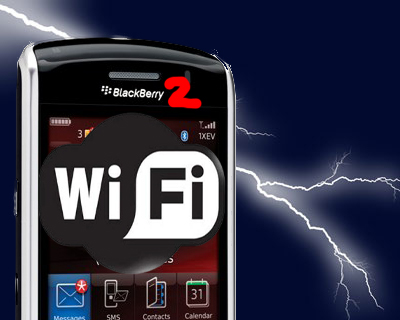
    BlackBerry Storm 2 coming in September, has WiFi

    According to a source very close to the issue, Verizon has given the go for RIM to release the BlackBerry Storm 2 in September of this year. The followup to the groundbreaking Storm that was released last year as the first touchscreen Blackberry, SlashGear has been told that the new Storm 2 addresses one of the biggest criticisms of the first smartphone and of Verizon devices in general, in that it will support WiFi.

    storm 2

    While we’re not able to name our source, we can say that we’ve no doubts regarding the veracity of their information. The source gave us their assurances that the Storm 2 would have WiFi, and would be an even better Pro-consumer device than the first Storm. We wonder if RIM and Verizon will make any changes to the touchscreen, a common point of complaint for the first-gen devices; comments he dropped lead us to believe WiFi isn’t the only thing RIM and Verizon have up their sleeve with the Storm 2.

    The original Blackberry Storm debuted as Verizon’s challenger to the iPhone, remains one of their flagship devices. With the release of Blackberry App World, the Storm is in an even better position to make a dent in Apple’s market share. The launch of the Storm 2 with WiFi and an improved touchscreen could draw both consumers and business users alike in to Verizon.